From HTML to Pixels: Architectural Design of Modern Web Browsers
The modern web browser is arguably the most sophisticated piece of client-side software in existence, serving as a gateway to the global network and a runtime environment for increasingly complex applications. To the end-user, the browser is a simple utility for navigating URLs; however, beneath this interface lies a multi-layered architecture that synchronizes networking, security protocols, language parsing, and high-performance graphical rendering. This report provides an exhaustive technical examination of browser internals, detailing the lifecycle of a web request from initial input to final pixel rasterization.
The High-Level Structural Framework: The Seven Functional Pillars
The architecture of a non-headless web browser is consistently divided into seven primary components, although specific implementations such as Mozilla’s Gecko or Google’s Blink may combine or subdivide these roles for optimization. These components operate in a coordinated ecosystem to ensure that data fetched from a remote server is transformed into a human-readable and interactive format.
The User Interface and the Browser Engine
The User Interface (UI) constitutes the visual layer that facilitates user interaction, excluding the main viewport where the document is rendered. This includes the address bar, navigation controls such as back/forward buttons, and stateful elements like bookmarks and history menus. It is a historical anomaly that the browser’s UI is not defined by any formal specification; instead, it has evolved through a process of competitive imitation, resulting in a de facto standard across major platforms.
Beneath the UI sits the Browser Engine, which functions as a marshal or intermediary. Its primary responsibility is to coordinate actions between the UI and the Rendering Engine. When a user enters a search query or a URI into the address bar, the Browser Engine interprets this input, determining whether it is a direct resource request or a search query to be redirected to a provider. It manages the state of the rendering engine, handling commands to stop, refresh, or navigate through the session history.
The Rendering Engine and Networking Component
The Rendering Engine is the core computational unit responsible for displaying requested content. Its primary task is to parse HTML and CSS, calculate the layout of elements, and paint them onto the screen. Distinct engines define the modern landscape: Chrome and Opera utilize Blink (a fork of WebKit), Safari remains on WebKit, and Firefox employs Gecko.
The Networking component provides the interface for network calls, such as HTTP or HTTPS requests. It is designed with a platform-independent interface that utilizes underlying operating system implementations for different network protocols. This layer handles the complexities of data transmission, including domain name resolution and the management of persistent connections.
JavaScript Interpretation and Persistent Storage
To handle the dynamic logic of modern web applications, browsers include a JavaScript Engine (or interpreter). This component parses, compiles, and executes JavaScript code, often using Just-In-Time (JIT) compilation to optimize performance. The interpreter interacts with the rendering engine via the Document Object Model (DOM) API, allowing scripts to manipulate the page structure in real-time.
Finally, the UI Backend and Data Storage layers provide the necessary infrastructure for graphical output and local state. The UI Backend draws basic widgets like checkboxes and windows, using generic interfaces that hook into the operating system’s native GUI methods. Data Storage acts as a persistence layer, managing everything from simple cookies to complex databases such as IndexedDB, WebSQL, and the FileSystem API.
Component | Responsibility | Examples |
User Interface | Visual controls and user interaction points | Address bar, Back/Forward buttons |
Browser Engine | Communication bridge between UI and Rendering | Chromium Browser Process |
Rendering Engine | Content parsing and visual display logic | Blink, WebKit, Gecko |
Networking | HTTP/HTTPS requests and socket management | TCP stack, TLS handshakes |
JS Interpreter | Script execution and memory management | V8, SpiderMonkey, JavaScriptCore |
UI Backend | Basic widget drawing and OS integration | Native window handles, combo boxes |
Data Storage | Local data persistence and caching | localStorage, IndexedDB, Cookies |
The Mechanics of Navigation: From URI Input to Resource Retrieval
The lifecycle of a webpage begins the moment a user initiates a navigation event. This process is not a single leap but a series of negotiated steps between the client and the global network infrastructure.

Uniform Resource Locators and DNS Resolution
While users interact with names like example.com, the underlying networking hardware requires IP addresses for routing. The browser first checks its local cache for a recently resolved IP. If not found, it initiates a DNS lookup. This request is fielded by a name server, which resolves the domain name into a numeric address (e.g., 93.184.216.34). This lookup must be performed for every unique hostname referenced by a page including those for fonts, images, and third-party scripts which can introduce significant latency, particularly on high-latency mobile networks.
Establishing a Reliable Connection: TCP and TLS
Once the IP address is obtained, the browser establishes a connection via the Transmission Control Protocol (TCP). This involves a three-way handshake designed to synchronize sequence numbers and ensure that both parties are ready to exchange data.
SYN: The client sends a sequence number to open the connection.
SYN-ACK: The server acknowledges the request and sends its own sequence number.
ACK: The client confirms receipt, and the connection is ready for data.
For secure connections (HTTPS), an additional TLS negotiation occurs. This handshake determines the encryption ciphers, verifies the server's identity through certificates, and establishes a secure session. In modern TLS 1.3 implementations, this process has been optimized to reduce the number of round trips required before the first HTTP request can be sent.
HTTP Request and Response Dynamics
With a secure tunnel established, the browser sends an HTTP request. In the context of modern browsing, this is often an HTTP/2 or HTTP/3 request, which supports multiplexing allowing multiple files to be requested simultaneously over a single connection. The server responds with headers followed by the payload, typically in 8 KB chunks.
Handshake Step | Messages Exchanged | Purpose |
DNS Lookup | Query/Response | Map domain to IP address |
TCP Handshake | SYN, SYN-ACK, ACK | Establish a reliable byte stream |
TLS Negotiation | Cipher Spec, Certificate, Key Exchange | Secure the communication channel |
HTTP Request | GET /path HTTP/1.1 | Request specific resource |
The Parsing Engine: Theoretical Foundations and Implementation
The transformation of raw text into a machine-understandable structure is the first phase of the rendering process. This involves "parsing," which transforms input into a parse tree reflecting the syntax of the language.
Grammars and the Chomsky Hierarchy
The complexity of parsing is determined by the language's grammar. Noam Chomsky categorized grammars into four distinct types, ranging from regular grammars (parseable via RegEx) to context-free and context-sensitive grammars. Most programming and markup languages fall into the context-free category, but HTML is a notable exception. Because HTML is designed to be error-tolerant allowing for missing tags or improper nesting it does not conform to traditional context-free parsing rules. Consequently, browser engineers have developed specialized, state-machine-based parsers to handle the "permissive" nature of web markup.
Lexical and Syntactic Analysis
The parsing process is split into two primary roles: the Lexer (or tokenizer) and the Parser.
Lexical Analysis: The lexer breaks raw input into atomic tokens based on the language's lexicon. For example, in an HTML string like
<div>, the lexer identifies the opening bracket, the tag name "div," and the closing bracket as a single "start tag" token.Syntactic Analysis: The parser takes these tokens and validates them against the language's syntax rules to construct a tree structure.
This process is iterative. The parser requests a token from the lexer, matches it to a rule, and adds a node to the tree before requesting the next token. For simple mathematical expressions like 2+3∗4, the parser creates a tree where the operators are parent nodes and the integers are leaf nodes, ensuring the correct order of operations.
HTML Parsing and DOM Construction
The output of the HTML parser is the Document Object Model (DOM). The DOM is the browser's internal representation of the document and serves as the primary interface for JavaScript. Because parsing is a streaming process, the browser can begin building the DOM tree as soon as the first 8 KB chunk of data arrives from the network, even before the full document is downloaded.
However, this process can be interrupted. When the parser encounters a <script> tag, it must stop and wait for the script to be fetched and executed before continuing. This is because JavaScript has the power to modify the DOM via document.write(), potentially invalidating the work the parser has already done.
The CSSOM and Style Recalculation
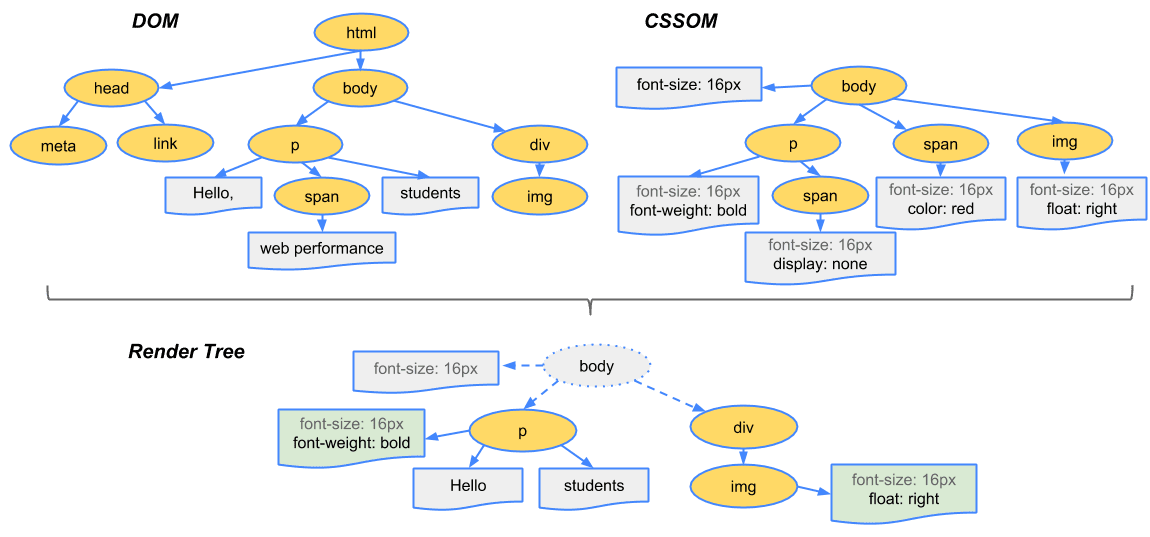
While HTML defines the structure, CSS defines the presentation. The browser parses CSS into the CSS Object Model (CSSOM).
Constructing the CSSOM
The CSSOM is a tree structure similar to the DOM, but it stores styling information rather than document content. It aggregates rules from external stylesheets, internal <style> blocks, and inline style attributes. The CSSOM is designed for efficient lookup; when the browser needs to style an element, it must quickly find all rules that apply to that element based on its tags, classes, and IDs.
The Cascade and Specificity
The "C" in CSS stands for Cascading, which refers to the logic used to resolve conflicts when multiple rules apply to the same element. The browser computes a specificity score for each selector. A simplified representation of the specificity formula is:
Specificity=(a,b,c,d)
Where:
a = inline styles
b = ID selectors
c = Class selectors, attributes, and pseudo-classes
d = Type selectors and pseudo-elements
Rules with higher specificity override those with lower specificity. If specificity is equal, the last rule defined in the stylesheet takes precedence. After calculating these values, the browser arrives at the "Computed Style" for every node, which is a full map of every CSS property and its final value (e.g., converting relative units like em to absolute px values).
The Rendering Pipeline: Transforming Data into Pixels
Once the DOM and CSSOM are constructed, the browser begins the rendering pipeline. This is a multi-stage process that determines what to draw and where to draw it.
The Render Tree
The browser combines the DOM and CSSOM to create the Render Tree. Unlike the DOM, which contains every element, the Render Tree only includes nodes that are actually visible on the screen. Elements with display: none are omitted entirely, along with non-visual tags like <head> or <script>. Each node in the Render Tree represents a rectangular box with specific visual attributes like color, border, and dimensions.
Layout (Reflow)
The Layout phase often called Reflow is the process of calculating the exact geometry of each box in the Render Tree. The browser traverses the tree, starting from the root (the viewport), and calculates the width, height, and coordinates for every element. This is a recursive process: a parent’s dimensions often depend on the dimensions of its children. For example, a <div> with width: 100% will take the full width of the screen, while its height will be the sum of its internal content's height.
Layout is a computationally expensive process. Any change to the DOM that affects geometry such as changing the font size or adding a new element triggers a reflow of that element and potentially its neighbors or parents.
Painting and Rasterization
Once the layout is determined, the browser enters the Painting phase. Painting involves recording a list of drawing commands (often called a display list) that describe how to fill in the pixels for each element. The browser must paint elements in the correct order, accounting for stacking contexts and z-index.
Rasterization is the process of taking these drawing commands and turning them into actual pixels. Modern browsers often use "tiled rasterization," where the page is split into small rectangular tiles. This allows the browser to re-rasterize only the portions of the page that have changed, rather than the entire document.
Compositing and GPU Acceleration
The final stage of the pipeline is Compositing. To improve performance during animations and scrolling, browsers promote certain elements to their own "layers". These layers are sent to the GPU, which can move, rotate, or fade them without requiring a full re-layout or re-paint. The compositor thread is responsible for stitching these layers together into a final frame for display on the monitor.
The browser typically aims for a refresh rate of 60 frames per second (FPS), meaning each frame must be processed in less than 16.67 milliseconds:
Tframe=601000 ms≈16.66 ms
Pipeline Stage | Action | Trigger |
Construction | Combine DOM + CSSOM into Render Tree | Initial load, visibility changes |
Layout (Reflow) | Calculate positions and sizes | Window resizing, DOM mutations |
Paint | Generate drawing commands | Style changes (color, shadows) |
Composite | Stitch GPU layers together | Scrolling, CSS transforms |
JavaScript Engines and the Runtime Environment
JavaScript is the engine of interactivity on the web, and its performance is critical to the perceived speed of a browser.
Just-In-Time (JIT) Compilation
Modern JavaScript engines, such as V8, do not simply interpret code line-by-line. Instead, they use a JIT compiler to turn JavaScript into optimized machine code.
Parsing: The engine parses code into an Abstract Syntax Tree (AST).
Ignition (Interpreter): The code is first converted into bytecode, an intermediate representation.
TurboFan (Optimization): If a piece of code is executed frequently ("hot code"), the engine compiles it into highly optimized machine code.
This process allows JavaScript to reach near-native performance levels, enabling heavy applications like Google Docs or 3D games to run in the browser.
The Event Loop and Concurrency
JavaScript is single-threaded, meaning it can only do one thing at a time. To handle asynchronous tasks like network requests or user input without freezing the UI, browsers use an Event Loop. When an asynchronous task is initiated, it is sent to the web APIs (provided by the browser) and then placed in a callback queue. The event loop continuously checks if the main thread is idle; if it is, it pushes the next task from the queue onto the stack for execution.
WebAssembly (WASM): The New Frontier
For computational tasks where JavaScript is still too slow, browsers now support WebAssembly. WASM is a low-level, binary format that allows languages like C++, Rust, and C# to run in the browser with near-native speed. Unlike JavaScript, WASM skips the heavy parsing and optimization steps because it is pre-compiled, making it ideal for video editing, 3D engines, and crypto-mining.

Modern Browser Architecture: Multi-Process Isolation
Historical browsers were monolithic; a single crash in one tab would take down the entire application. Modern browsers have moved to a multi-process architecture to improve stability and security.
Process Separation and Site Isolation
In a multi-process browser like Chromium, the work is divided among several specialized processes :
Browser Process: The main process that manages the UI, address bar, and disk access.
Renderer Process: Each tab (or site) typically gets its own renderer process. This process contains the rendering engine, the JS engine, and the parser.
GPU Process: Handles all drawing commands from across the different tabs and composites them onto the screen.
Plugin Process: Isolates extensions and plugins so they don't affect the rest of the browser.
Chromium has further enhanced this with "Site Isolation," ensuring that different origins (e.g., google.com and malicious.com) are always in separate processes. This prevents side-channel attacks like Spectre from reading data across origin boundaries.
Sandboxing and Inter-Process Communication (IPC)
Renderer processes are "sandboxed," meaning they have no direct access to the computer’s filesystem or hardware. If a renderer needs to save a cookie or display a file, it must send a message to the Browser Process via Inter-Process Communication (IPC). The Browser Process then validates the request before executing it, providing a crucial layer of defense against malware.
Performance Optimization and Critical Path Management
The "Critical Rendering Path" is the sequence of steps the browser takes to convert the HTML, CSS, and JavaScript into pixels. Optimizing this path is the primary goal of modern web performance.
The Preload Scanner and Speculative Parsing
To mitigate the blocking nature of scripts and stylesheets, browsers use a "preload scanner". While the main parser is blocked by a script, the scanner "looks ahead" in the HTML for high-priority resources like images, external JS, and CSS. It initiates these network requests in the background, ensuring that the resources are ready by the time the main parser needs them.
Managing Cumulative Layout Shift (CLS)
User experience is often marred by content that "jumps" as images or ads load. This is measured as Cumulative Layout Shift (CLS). Browser engines can minimize this if developers provide dimensions (width and height) for media elements, allowing the layout engine to "reserve space" for the asset before it has even finished downloading.
Caching and Persistence Strategies
Browsers employ sophisticated caching mechanisms to avoid redundant network requests.
Memory Cache: Stores resources for the current session.
Disk Cache: Persistent storage for images and scripts across browser restarts.
Service Workers: Allow developers to programmatically control caching, enabling offline functionality.
The Future of Browsing: WebGPU and AI Integration
As we move into 2025 and 2026, browser architecture is shifting toward deeper hardware integration and artificial intelligence.
WebGPU: Lower-Level Graphics Access
WebGPU is the next-generation API for graphics and compute in the browser. It provides a more direct interface to the user’s GPU than WebGL, reducing driver overhead and enabling more complex 3D scenes and machine learning tasks to run natively in the tab.
The AI-Powered Browser
Modern browsers are increasingly incorporating AI directly into their core processes. Chrome’s "Performance Detection" tool uses AI to identify memory-heavy tabs and suggest fixes to the user. Firefox and Edge have integrated AI assistants into the browser sidebar, allowing for real-time summarization and content generation. This represents a shift where the browser is no longer just a passive renderer, but an active participant in the user’s workflow.
Synthesis and Engineering Conclusions
The browser's internal architecture is a study in balancing conflicting priorities: security vs. speed, flexibility vs. standards, and memory usage vs. performance. The transition from the monolithic designs of the early 2000s to the multi-process, GPU-accelerated environments of today reflects the internet's evolution from a collection of static documents to a global application platform.
Understanding the rendering pipeline from the initial DNS lookup to the final composited frame is essential for engineering modern web applications. Every stage of the pipeline presents a potential bottleneck, but also an opportunity for optimization. By leveraging the preload scanner, minimizing layout-triggering changes, and utilizing WebAssembly for heavy computations, developers can create experiences that feel instantaneous and fluid to the end-user. As browsers continue to integrate advanced technologies like WebGPU and AI, the line between native applications and web-based software will continue to blur, solidifying the browser's position as the most critical piece of software in the modern computing stack.