The Functional Handshake: Why Callbacks Define JavaScript
In the high-stakes world of software engineering, we often talk about "inversion of control." In JavaScript, this isn't just a design pattern it's a core survival mechanism. To understand why JavaScript is built the way it is, you have to understand the Callback.
Top-tier industry leaders don't view callbacks as just "functions inside functions." They view them as a way to handle the unpredictable nature of time and external resources.
1. Functions are First-Class Citizens
Before we talk about callbacks, we have to acknowledge a fundamental truth: in JavaScript, functions are values. You can store them in variables, put them in arrays, and crucially pass them as arguments to other functions.
The Concept: A callback is simply a function passed into another function with the expectation that it will be "called back" at a later time.
function greet(name, callback) {
  console.log(`Hello, ${name}!`);
  callback(); // The "Handshake"
}

greet("Alex", () => {
  console.log("The callback has been executed.");
});
2. Why Callbacks Exist: The Async Problem
JavaScript is single-threaded. It can only do one thing at a time. If we had to wait for a database to respond or a large file to load synchronously, the entire browser (or server) would freeze.
Callbacks are the solution to "Waiting." Instead of stopping the thread, we tell JavaScript: "Go start this task, and when you're finished, run this function I'm giving you."
Common Scenarios:
Event Listeners: "When the user clicks this button, run this callback."
Timers: "Wait 3 seconds, then run this callback."
API Requests: "Fetch this data, and when it arrives, run this callback to process it."
3. The Execution Flow
When you pass a callback, you aren't running it immediately. You are providing a recipe for the future.
console.log("Start");

setTimeout(() => {
  console.log("Inside Callback (after 2 seconds)");
}, 2000);

console.log("End");

// Output:
// Start
// End
// Inside Callback (after 2 seconds)
Notice how "End" prints before the callback. This non-blocking behavior is what allows Node.js and modern web apps to handle thousands of concurrent operations without crashing.
4. The Architectural Limit: Callback Nesting
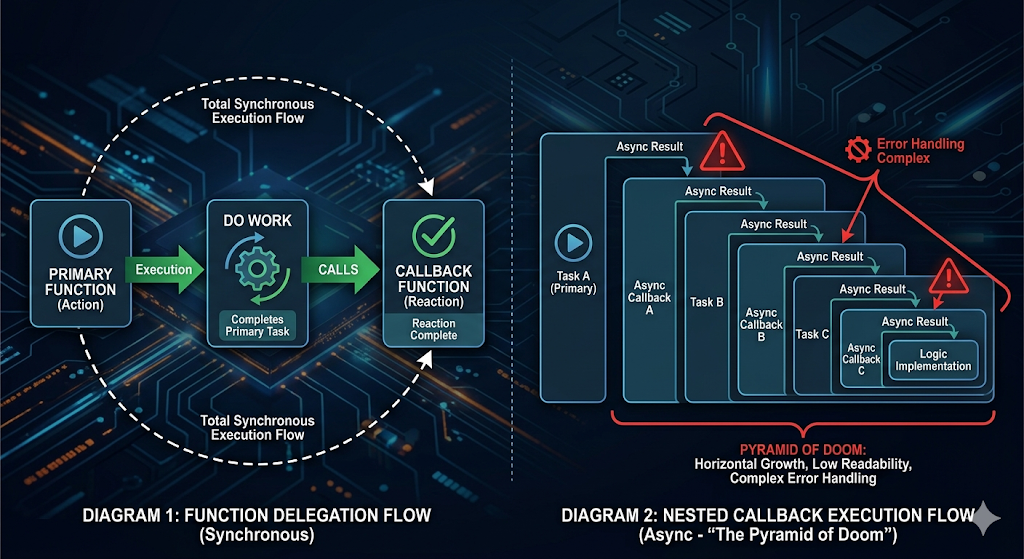
As powerful as they are, callbacks have a breaking point. When you have multiple dependent asynchronous tasks, you end up with code that grows horizontally rather than vertically.
The Problem: We call this "Callback Hell" or the "Pyramid of Doom."
getData(user, (err, profile) => {
  getPermissions(profile, (err, rights) => {
    updateDatabase(rights, (err, success) => {
      // Logic becomes buried in levels of nesting
    });
  });
});
This nesting makes error handling incredibly difficult and code reviews a nightmare. Every senior engineer has, at some point, looked at a nested callback chain and realized it was time to refactor into Promises or Async/Await.
Takeaway
Callbacks are the building blocks of JavaScript's asynchronous nature. Even though we now have more modern abstractions, understanding callbacks is non-negotiable. It teaches you how the Event Loop handles tasks and how functions can be used to manage the flow of data over time.
Seniority is knowing when to use a simple callback for a quick event listener and when to move toward a more robust asynchronous pattern to keep your codebase maintainable.